
PPC Lead Generation: Scalable Quality for Contractors

A paid click is only the start of a contractor lead. Pay per click lead generation can bring prospects from search and social, but a lead is captured only when the next step works, whether that is a call, a form, or a Local Services Ads inquiry. You can manage lead capture manually; a clear process for responding and recording results matters more than having an automation tool.
It makes sense to want control over your spending and understand which inquiries can turn into booked work. The challenge is connecting each campaign to real outcomes, not just clicks or form submissions. This article explains how bidding, automation, landing pages, and lead channels affect lead volume and capture, and where a manual workflow fits.
You’ll learn how search, social, and Local Services Ads bring prospects to you, why landing-page friction can lose an inquiry, and how tracking calls and forms helps you assess campaign performance. The goal is a practical system for turning paid interest into leads your team can follow up on.
Key Takeaways
- Measure cost per qualified lead and sales-qualified lead outcomes, not just clicks or form submissions, to connect ad spend with sales potential.
- Use campaign automation to monitor performance and guide adjustments, while judging success by revenue and return on investment.
- Assess keyword relevance and search volume together: both influence auction competition and the cost of reaching contractors’ prospective customers.
- Reduce friction on landing pages and make the next step clear so more paid visits can become usable inquiries.
- Match lead capture to the channel, with a defined process for handling calls, social inquiries, and Local Services Ads leads.
How fast can PPC lead-gen programs deliver measurable lead volume?
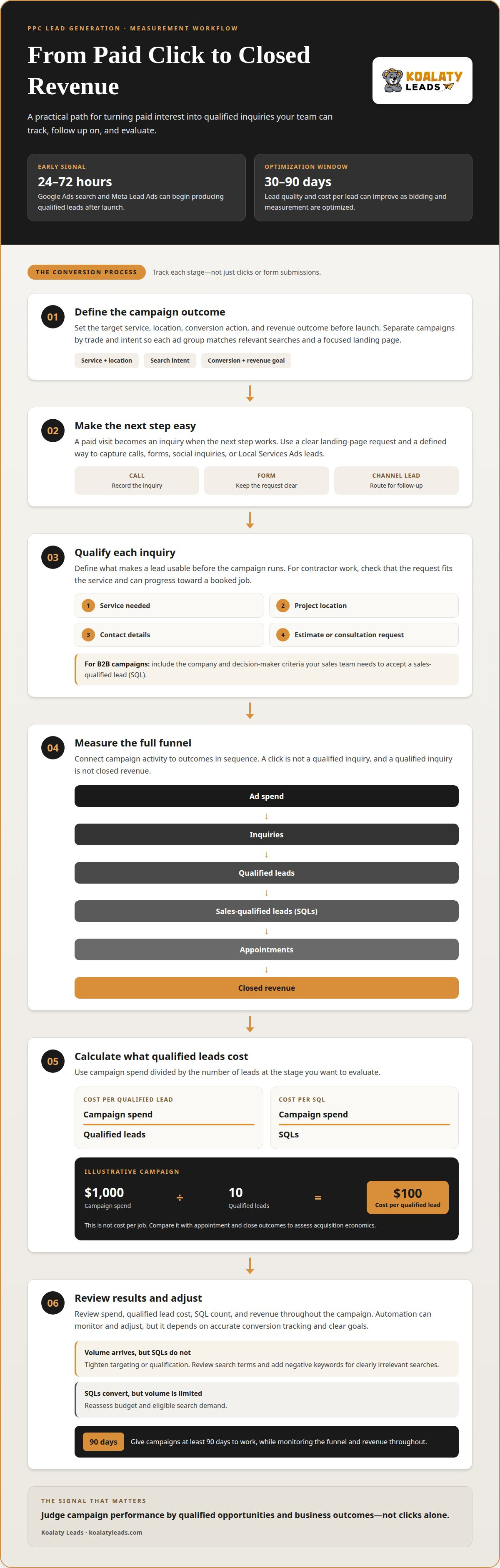
Google Ads search campaigns and Meta Lead Ads can begin producing qualified leads within 24-72 hours after launch. Treat that as an initial signal, not a verdict: lead quality and cost per lead can improve over 30-90 days as bidding and measurement are optimized.
There is no single average cost per lead across industries on Google Ads. Cost depends on keyword competition, location, service, landing-page conversion, and what counts as a lead. Click cost alone cannot tell you what a sales-ready inquiry costs.
For contractors, a form submission becomes useful only when it fits the work you sell and can progress toward a booked job. Define qualification before launch: service needed, project location, contact details, and a clear request for an estimate or consultation. For B2B campaigns, add the company and decision-maker criteria your sales team needs to accept a sales-qualified lead, or SQL.
Measure the funnel in order: ad spend, inquiries, qualified leads, SQLs, appointments, and closed revenue. Divide campaign spend by qualified leads to find cost per qualified lead, then divide it by SQLs to find cost per SQL. An illustrative campaign spending $1,000 and producing 10 qualified leads has a $100 cost per qualified lead. That figure is not the cost per job; compare it with appointment and close outcomes to judge whether acquisition economics work.
You may pay for accidental clicks or clicks from people who are not looking for your service, using budget without generating a qualified inquiry. Irrelevant search traffic, weak qualification, and delayed follow-up can also waste spend. Track each stage so a click is not mistaken for revenue.
Targeting shapes lead quality before the first call. Separate campaigns by trade and intent, then connect each ad group to relevant searches and a matching landing page. For example, a roofing campaign for replacement inquiries should not treat unrelated repair searches as equivalent. Add negative keywords for searches that clearly do not match your services, and review search terms regularly to catch new sources of irrelevant traffic.
Speed matters, but the first lead is only the beginning. Give PPC campaigns at least 90 days to work, while reviewing spend, qualified lead cost, SQL count, and revenue throughout that period. If volume arrives but SQLs do not, tighten targeting or qualification; if SQLs convert but volume remains limited, reassess budget and eligible search demand.
How can AI and automation help with PPC campaigns?
Automation can speed up campaign monitoring, testing, and budget adjustments, but it still needs a clear strategy. Google Ads policies govern ad content and eligibility, while U.S. requirements may affect how you collect and use lead information.
Campaign Setup and Optimization
Before launching, define the target service, location, conversion action, and revenue outcome for each campaign. Use analytics to connect ad clicks with qualified inquiries and closed work, then optimize for results that support return on investment, not just a lower cost per click. Automated bidding can adjust bids using campaign signals, but it relies on accurate conversion tracking.
Ad Content and Campaign Management
Automation can help monitor budgets and flag campaign changes, while people remain responsible for accurate claims and useful ad content. For example, a roofing ad should match the service and offer on its landing page. Regularly review search terms, calls, and form submissions; pause irrelevant themes and update copy when it attracts the wrong inquiries. Google recommends tracking return on investment and continually fine-tuning ads.
Build compliance into your workflow. Keep ad claims accurate, make form expectations clear, and explain how submitted information will be used. Google Ads policies apply to campaign content and eligibility; applicable U.S. requirements can also shape how lead data is collected and handled. A clear process supports campaign quality and the prospect experience.
Testing and Campaign Scaling
A/B testing compares one meaningful change at a time, such as a headline or call to action, so analytics can show which version produces stronger qualified responses. Avoid judging a test by clicks alone. Once a campaign consistently produces valuable leads, increase its budget cautiously; the campaign guidance recommends increases of no more than 15-20% every few days for top performers.
A measured approach helps protect performance as you grow. If lead quality drops after a change, review the audience, search terms, and conversion data before increasing spend. Record each test and its business outcome so the next optimization builds on evidence rather than guesswork.
Intent-Based Campaign Structure
Organize campaigns around what prospects want, not one broad list of services. Separate high-intent searches, such as requests for a replacement estimate, from research-oriented queries, then align each group’s keywords, ad message, and landing page. This structure gives automated bidding clearer signals and helps your team see which intent generates qualified opportunities and revenue.
For a focused discussion about lead opportunities in your trade and market, talk with Koalaty Leads.
How does the keyword bidding process work in PPC?
Google Ads runs an auction when a search is eligible to show an ad. Keyword demand and competition influence the result, while bids and relevance help determine placement and click cost.
Search Volume and Auction Costs
Search volume estimates how often people enter a keyword, not how many will contact your business. Lower Google keyword search volume may make it cheaper to win an auction, but a less common phrase may also bring fewer visitors. Consider relevance alongside volume: a specific service search can be more useful than a broad term that attracts unrelated traffic.
Competition affects the amount paid per click. In one auction example, an advertiser with a maximum bid of $2 pays $1.51 when the next-highest bidder offers $1.50. This illustrates how an auction can charge less than an advertiser’s maximum bid; it is not a standard U.S. rate. Actual costs depend on the keyword and the businesses competing for it.
Keyword and Negative Keyword Research
Choose terms that describe the services your contracting business wants to sell. Setting up a Google Ads campaign involves selecting target search terms, writing an ad, and setting an advertising budget. Group closely related keywords so the ad speaks directly to that search intent. For example, a phrase naming a specific installation service differs from a general query about contractors.
Negative keywords exclude searches that do not fit your business. Review the search terms that triggered your ads, then add exclusions for irrelevant intent, such as employment or training queries. Keep exclusions specific to your services: a broad negative keyword can block a useful search, while a precise one can reduce mismatched clicks.
Geo-Targeting and Ad Rank
Set geographic targeting to match the markets your business serves. Pair that setting with relevant keywords, then review where impressions and clicks originate. Search traffic from outside your service area can use budget without producing a workable opportunity, so make location settings part of your campaign structure from the start.
Google describes Ad Rank as the product of the bid and Quality Score. Quality Score considers keyword quality, the relevance of the keyword to the ad, and the landing-page user experience. A higher bid alone does not determine position. Align each ad with its keyword and destination page, then use campaign tracking to assess whether the resulting traffic fits your targeting.
Review keyword performance before changing bids. Compare search relevance, auction competition, and eligible volume. If a term attracts the wrong searches, refine its targeting or exclude those queries. If it matches your service and audience, assess its performance before adjusting the bid. This keeps bidding decisions grounded in the specific search rather than a blanket account-wide increase.
Landing pages and conversion rate optimization
A landing page turns a paid visit into a measurable action, such as a call or form submission. Match the page to the ad, then measure whether those actions lead to valuable business outcomes.
There is no single typical PPC lead conversion rate across industries. Results depend on search intent, service, audience, location, page experience, and the conversion being measured. Compare campaigns using the same definition, such as a qualified inquiry rather than any form completion.
Make the page specific to the ad’s promise. A window replacement ad should lead to a page about replacement inquiries, not a broad services page. Put the relevant service, service area, and next step near the top. On mobile, keep the call button easy to use and avoid forcing visitors to search for the form.
Reduce form friction without removing details your team needs. A form shortened from ten fields to five could increase conversions by 25% or more. Keep essential routing fields, such as contact information, requested service, and project location. A confirmation message should then explain what the visitor has submitted and what happens next.
Track calls, submitted forms, qualified inquiries, appointments, and completed sales as separate actions. A platform that counts every form equally can overstate performance when some requests are irrelevant or incomplete. Use distinct conversion events so reports distinguish initial contact from progress through your sales process.
Connect campaign records with your CRM to retain each inquiry’s source and subsequent status. When a sales representative records an appointment or sale, associate that offline outcome with the originating ad interaction. This closed-loop view shows which traffic contributes to actual business, rather than stopping measurement at the landing-page visit.
Keep page tests focused. Change one element, such as the headline, form length, or call-button wording, and compare the same conversion event before and after. Check that calls and forms are attributed correctly, duplicate submissions do not inflate results, and CRM updates preserve the campaign source. These checks make page improvements easier to assess against meaningful outcomes.
Lead capture across search, social, and Local Services Ads
Search, social, and Local Services Ads offer contractors different ways to receive inquiries. Match each channel’s capture method to how prospects contact you, then assign every inquiry to a clear owner.
| Channel | Lead capture | Operational trade-off |
|---|---|---|
| Google search ads | Clicks lead to a website, call, or form. | Prospects are actively searching, but the contractor must make the next step clear. |
| Social ads | Meta Lead Ads can collect details in-platform, or ads can send visitors to a landing page. | In-platform forms reduce the handoff; website forms allow a tailored inquiry flow. |
| Local Services Ads | Inquiries can arrive as calls or messages through Google. | Staff need to recognize the source and handle the conversation promptly. |
For Google search ads, keep the path from query to contact straightforward. A prospect searching for a roofing estimate may call directly or submit a website form. Make sure the person answering can identify the requested service and route the inquiry to the right sales representative, rather than treating it as a general office call.
Social capture needs its own intake routine. Meta’s in-platform form can gather basic contact details while someone browses Facebook or Instagram. If the ad instead directs visitors to a landing page, they leave the social platform to contact you. Decide who reviews each source and how sales staff receive the details.
Local Services Ads need a clear call and message process. Staff should know how to distinguish these inquiries from calls generated by search ads or existing customers. A simple intake record can note the channel, requested service, assigned employee, and next action. This keeps handoffs clear even when someone answers the phone manually.
You can manage this process without automation. Assign an employee to review inquiries from each channel, record the source, and route each lead to the appropriate salesperson. For example, a social form requesting a kitchen estimate should reach the team handling remodeling inquiries, while a service call should follow the relevant call intake process.
Preserve the channel distinction during follow-up. If a prospect calls after seeing a search ad, record that source; if someone submits a Meta form, retain its social origin. Separate records make it easier to see which capture method fits your team’s workflow and which inquiries become appointments or sales.
The takeaway is simple: choose a capture path your team can manage consistently, then assign ownership by channel. A reliable handoff turns search, social, and Local Services Ads activity into actionable sales conversations.
Koalaty Leads
Koalaty Leads is a next step for contractors who want lead opportunities for specific home improvement services without managing every paid campaign themselves. Its offerings include roofing leads, window replacement leads, bathroom remodel leads, and kitchen remodeling leads.
Consider reaching out when you’re evaluating lead sources for your trade and market, or when you want to discuss how exclusive opportunities could fit your current sales process. The right lead channel depends on your service focus and how your team handles incoming inquiries.
Contact Koalaty Leads to discuss lead opportunities for your trade and market.
Make your next lead decision count
Use your campaign goals to decide what kind of opportunity your team needs next. A focused conversation about trade, market, and lead handling can help clarify whether paid clicks, exclusive leads, or live calls best fit your sales process. Pay per click lead generation works best as part of a deliberate plan for turning inquiries into qualified opportunities, not as a standalone traffic target.
Koalaty Leads offers roofing leads, window replacement leads, and bathroom remodel leads for contractors seeking opportunities in those trades. Discuss how those lead options may fit alongside your existing marketing and follow-up approach.
Build around the work you want, the customers you can serve, and a process your team can sustain. Clear priorities create a stronger foundation for steady growth.
Frequently Asked Questions
Can I do this manually, without an automation tool?
Yes. You can manage a small PPC campaign manually by reviewing inquiries, recording their source, and tracking outcomes in a spreadsheet. For each lead, log the service requested, contact status, appointment result, and eventual sale. A manual process works only when someone consistently owns the updates. As inquiries grow or arrive across several platforms, missed entries make campaign comparisons less reliable.
How long does this actually take to work?
Search and Meta campaigns may begin bringing qualified leads within 24-72 hours after launch, but early activity does not establish steady performance. Lead quality and cost can improve over 30-90 days as bidding and measurement are optimized. Allow enough time to assess qualified inquiries and sales outcomes, rather than deciding based only on the first clicks or form submissions.
What are some popular PPC platforms?
Common options include Google Ads, Microsoft Advertising through Bing, and Meta Ads on Facebook and Instagram. LinkedIn Ads can target professional audiences by factors such as job title, company size, and industry. For a residential contractor, choose a platform based on how prospects search for and contact businesses, not simply which advertising dashboard your team already uses.
What are some tips for an effective PPC campaign?
Give each campaign a specific service and audience, and match its ad promise to the destination page. Exclude search terms that clearly do not fit your work, and make calls or forms easy to find. Track qualified inquiries and booked appointments alongside clicks. If a campaign attracts requests outside your service scope, refine its targeting before increasing spend.
What is pay-per-click lead generation and how does it work?
Pay-per-click lead generation uses paid ads to attract visits, then aims to convert those visits into inquiries. The advertiser pays when someone clicks; a prospect may then call, submit a form, or take another tracked action. The click itself is not a lead. Lead value depends on whether the inquiry fits your services and can progress toward a sales opportunity.
How much does PPC lead generation cost in the United States?
There is no single U.S. cost that applies to every contractor campaign. Advertising costs depend on auction competition, selected searches, targeting, and how effectively visits turn into leads. To assess performance, divide campaign spend by valid inquiries, then calculate a separate cost for qualified leads or booked jobs. This separates click expense from the outcomes that matter to your business.
Which PPC platforms are best for lead generation: Google, Microsoft, Facebook, or LinkedIn?
The best platform depends on the audience and intent you need to reach. Google and Microsoft search ads can reach people actively looking for services; Facebook can reach people while they browse. LinkedIn is suited to targeting professional attributes, which can matter more for business-to-business work. Compare platforms by qualified inquiries and sales, not clicks alone.
Need exclusive leads instead of shared ones? Koalaty Leads delivers qualified homeowners — web leads or live call transfers — to one contractor only.
Get Started